Why ZFS is actually cool
I thought ZFS was overhyped#
Back in 2016 I ran Proxmox with ZFS on one node like everyone else, then decided a single node doesn't need it and that ext4 and btrfs are good enough for everybody. Then fsync on ext4 turned out to be too expensive, only a few filesystems can do anything about it, and ZFS is one of them. Along the way I changed my mind on two more ZFS features I used to dismiss.
fsync on ext4 is too expensive#
Take my box as the example: about ten services, most of them on SQLite, on two HDDs in mdadm RAID1 with ext4 on top.
I had set commit=60, so a crash costs up to a minute of writes.
It's a homelab with no payment data, most of the state mirrors something external that I can upload again, and the box had 370 days of uptime, so I was fine with that.
Disk utilization stayed high anyway.
commit=60 only stretches the periodic journal commit, and fsync doesn't give a shit about it.
fsync writes out the file's own data, forces a journal commit of the whole running transaction right away, and then flushes the disk cache on both mirrored disks with everything anyone has written into it.
On a busy HDD it queues behind everybody else's in-flight writes, so one fsync can end up waiting on 3 GB of somebody else's I/O.
fast_commit wouldn't save me either: it shrinks the commit, but every fsync still ends with that flush.
What the ext4 code does on fsync (Linux 7.3)
fsync on a regular file asks jbd2 to commit the running transaction and remembers whether that commit will carry a flush of its own.
if (journal->j_flags & JBD2_BARRIER &&
!jbd2_trans_will_send_data_barrier(journal, commit_tid))
*needs_barrier = true;
return ext4_fc_commit(journal, commit_tid);issue_flush:
if (needs_barrier) {
err = blkdev_issue_flush(inode->i_sb->s_bdev);
if (!ret)
ret = err;
}The commit record goes out with REQ_PREFLUSH | REQ_FUA, so the disk writes out everything in its cache before it.
if (journal->j_flags & JBD2_BARRIER &&
!jbd2_has_feature_async_commit(journal))
write_flags |= REQ_PREFLUSH | REQ_FUA;
bh_submit(bh, write_flags, journal_end_buffer_io_sync);fast_commit writes its tail block the same way.
static void ext4_fc_submit_bh(struct super_block *sb, bool is_tail)
{
blk_opf_t write_flags = JBD2_JOURNAL_REQ_FLAGS;
struct buffer_head *bh = EXT4_SB(sb)->s_fc_bh;
/* Add REQ_FUA | REQ_PREFLUSH only its tail */
if (test_opt(sb, BARRIER) && is_tail)
write_flags |= REQ_FUA | REQ_PREFLUSH;I timed 200 log writes of 1500 bytes, each followed by fdatasync:
| p50 | p95 | max | |
|---|---|---|---|
| idle | 30 ms | - | 184 ms |
| during a 3 GB background write | 31 ms | 1.4 s | 4.1 s |
It hurts the other side too. The 3 GB write took 59.8 s with the fsyncs running and 42.5 s without them, so fsync from one process slowed its neighbour's write by 40%.
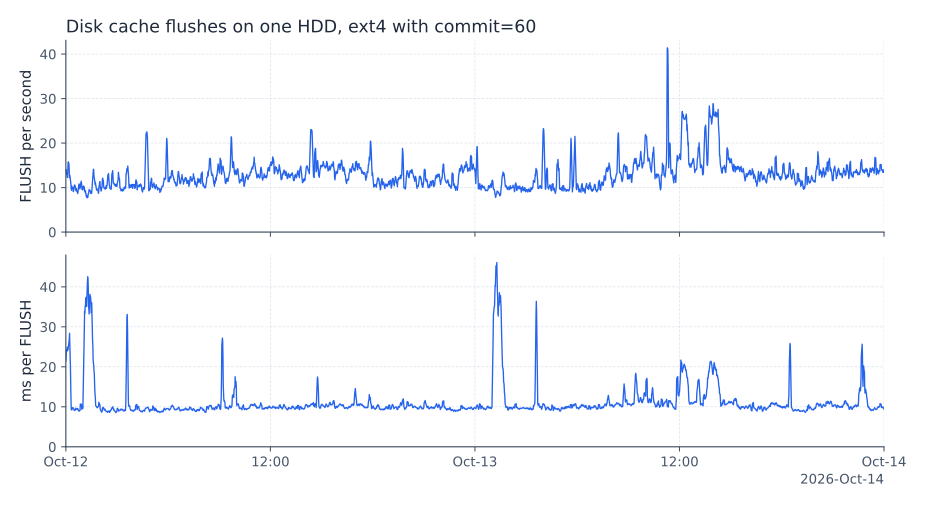
node_exporter showed what one of the disks itself was doing over 22 hours:
| value | |
|---|---|
| FLUSH/s, most of the time | 10-15 |
| FLUSH/s, at times | 20-30 |
| FLUSH/s, peak | one spike near 80 |
| average flush latency | 10-18.5 ms |
| time spent flushing | 100-278 ms of every second |

Why batching fsync in userspace doesn't help#
Patching every app means a fork, a rebuild and WAL settings for each of ten apps. That's a pain, and I wanted one fix for the whole box. People also abuse write + fsync + rename to publish a file atomically, when in most cases write + rename is enough if the filesystem orders the data before the rename.
Making fsync a no-op on ext4 or XFS, with eatmydata or SystemCallFilter=~@sync, loses ordering across files.
After a crash, SQLite's WAL can land on disk after the database pages it refers to.
Then the whole database is broken, which is much worse than being a minute behind.
I thought it would be nice to batch those fsyncs instead, so the flush is paid once per window and not once per service.
Without searching any further I hacked up a small prototype: a seccomp user notification filter intercepts fsync and fdatasync in every service, and a daemon holds the calls for a window and releases them together.
It fails in two ways.
If it acks an fsync that hasn't happened yet, things get weird on recovery, and then I might as well make fsync a no-op.
And fsync blocks the caller, so one process puts at most one call into each batch.
Batch size is call rate x window, and the call rate falls as the window grows.
I get fewer flushes and the apps slow down by the same amount.
I tested it on a FUSE disk that sleeps 10 ms on every flush:
| writers | batching window | op/s |
|---|---|---|
| 1 | none | 46 |
| 1 | 20 ms | 24 |
| 4, in a loop | none | 94 |
| 4, in a loop | 20 ms | 94 |
Four writers get nothing from the window because the kernel already batches concurrent fsyncs: everyone waiting on the same journal transaction is released by one commit and one flush.
And when the daemon dies, every fsync in every intercepted process returns ENOSYS, which for Postgres is a PANIC. BADBADNOTGOOD.
Batching pays off only when apps don't wait for the flush, and that is sync=disabled.
So the fix belongs in the filesystem.
And I wasn't the first to get there — people have been working on this since around 2008:
- Josef Bacik's fsync batching in jbd, then Ric Wheeler's version, which became the ext4 knobs
min_batch_timeandmax_batch_time. - O_PONIES and
auto_da_allocin 2009, after ext4 and data loss. - OptFS (SOSP 2013), "Don't stack your log on my log" (2014), and BarrierFS (FAST 2018).
- The 2015 LKML thread "Tux3 Report: How fast can we fsync?".
- Group commit in databases: Postgres
commit_delay, MariaDBbinlog_commit_wait_*, RocksDB WAL group commit.
Ordering, not durability#
Unix fsync promises two things: durability and ordering. I only need ordering. An app writes A, syncs, writes B, syncs. After a crash the disk holds both, or neither, or A alone, and never B without A. That keeps the app's checkpointing logic correct. Losing both A and B is fine, since I already accepted losing a minute.
sync=disabled is a free write barrier#
At the end of October I rebooted the box into a ZFS mirror with sync=disabled on every dataset.
ZFS commits transaction groups (txgs) in order and finishes each one by writing the uberblock.
After a crash the disk holds a prefix of history.
With sync=disabled, fsync returns right away.
A crash loses up to three txgs, which is tens of seconds on these disks, and the pool comes back whole as of that moment.
btrfs and bcachefs are copy-on-write too. bcachefs has options to delay or disable journal flushes, btrfs has no first-class knob for it, and XFS can't do it at all.
Copy-on-write also suits random writes on HDDs, because a txg lays logically random blocks out in one sequential pass. (GOD I LOVE LSM TREES NEED TO WRITE A POST ABOUT THEM) The costs are fragmentation and write amplification from recordsize. Update 4K, write a whole 16K block.
In September I added a write amplification metric to modern-fs-benchmark (fenio/modern-fs-benchmark#56, dm-linear plus dmstats). Medians of 10 runs on 4 SAS HDDs:
| config | randwrite IOPS (fdatasync every 16) | write amplification | cp -r 20k files + sync | p99 small fsync under load |
|---|---|---|---|---|
| ext4 md-raid10 | 306 | 4.0 | 24.9 s | 1854 ms |
| xfs md-raid10 | 291 | 6.7 | 2.2 s | 977 ms |
| zfs mirror, recordsize 128K | 1232 | 46 | 2.5 s | 1401 ms |
| zfs mirror, recordsize 8K | 1570 | 6.2 | 2.6 s | 1585 ms |
| bcachefs replicas=2 | 914 | 3.1 | 2.5 s | 1250 ms |
| btrfs raid1 | 195 | 13.6 | - | ~7 s |
The 46 at 128K comes from a 4K page write rewriting a whole 128K record, 32x, on both mirror legs. With small records, the ZFS mirror had the most random-write IOPS of the lot and write amplification on par with XFS.
What changed on the disks#
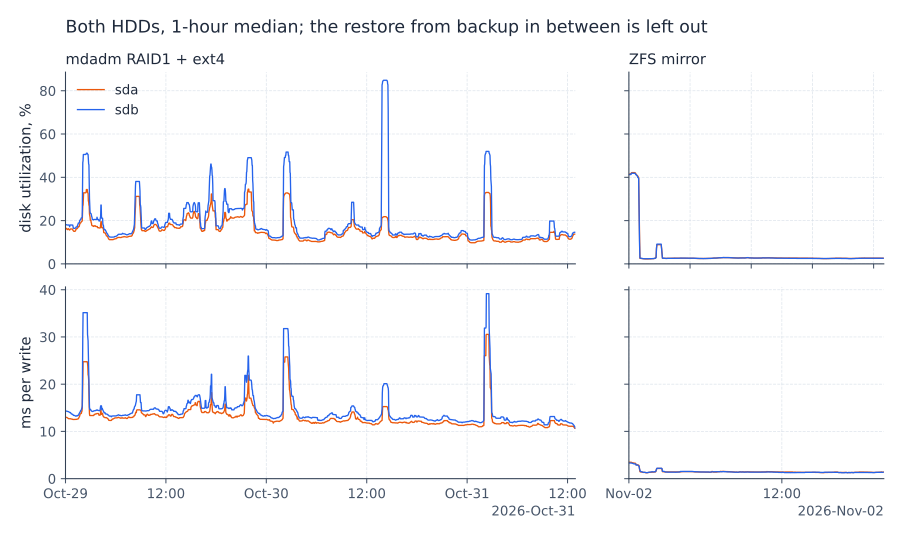
Both disks together, quiet hours only: the two days before the switch (md + ext4) against the day after (ZFS). Latency is the first hour after the switch against the previous week:
| ext4 | ZFS | |
|---|---|---|
| disk utilization | 13% | 2.7% |
| write | 1.05 MB/s | 0.6 MB/s |
| write IOPS | 53 | 41 |
| average write latency | 16 ms | 4 ms |
| average read latency | 16 ms | 14 ms |
Utilization is 5x lower.
The read latency is skewed by the restore load.
The ZIL counters stayed at zero over 22.7 hours, which makes sense: with sync=disabled nothing goes through the ZIL.

A dataset per workload#
The pool and root have ashift=12, compression=zstd, atime=off, xattr=sa, acltype=posixacl, dnodesize=auto and sync=disabled, and every dataset inherits them.
Most of these are about not paying extra seeks on an HDD: atime=off skips a write per read, and xattr=sa with dnodesize=auto keeps extended attributes and POSIX ACLs inside the dnode instead of in a separate hidden object, so reading metadata is one I/O instead of two.
ashift=12 just matches the 4K sectors.
Each dataset matches recordsize to how its app writes:
| dataset | mountpoint | recordsize | compression | for |
|---|---|---|---|---|
| state | /var/lib | 16K | zstd | SQLite, PostgreSQL, Forgejo |
| state/chertog | 128K | zstd | tantivy index | |
| state/immich | 1M | off | photos, already compressed | |
| state/clickhouse | 1M | off | ClickHouse compresses its own parts; recompressing on every merge wastes CPU | |
| root, nix, home, log | 128K | zstd |
There's no dedup, no L2ARC and no SLOG, and ARC is capped at 16 GiB.
The pool compresses 2.32x, and /nix takes 21.6 G on disk for 43.5 G of data.
Snapshots are about atomicity#
I thought snapshots were useless. You should have real backups, in several places, and you don't need me to tell you that. They turn out to be the way to back up a live service: take a snapshot, back up from it, delete it. Without one, I had to stop a service so its database and its files on disk agree. Take an app with SQLite plus files on disk. Back it up live, and the database points at files the backup doesn't have, or the backup has files no row points at. Congratulations, you've just orphaned those poor files, and now they're going to get reaped.
Now borgmatic reads from a ZFS snapshot: no service is stopped, the backup got faster, and it costs nothing.
Restoring from backups on NixOS#
SSH into the live system. Kexec into an installer. Let disko format the disks. Restore from backups. Reboot.
Sounds too good to be true, right? Well, that's why we have Nix.
It has tradeoffs though#
You have to know what your app is doing with the disk. But the rules are simple:
- Databases. Is it B-tree based, like Postgres, SQLite, or MySQL? Then your
recordsizeshould match the DB page size. If you have a 128Krecordsizeand a 4K page in the DB, every 4K write will rewrite 128K. Buut bigger pages give the compressor a bigger window. If it's LSM based then you should be golden. - Static stuff. Simple: slap a big
recordsizeon it and forget about tweaking.
Turns out it wasn't overhyped.